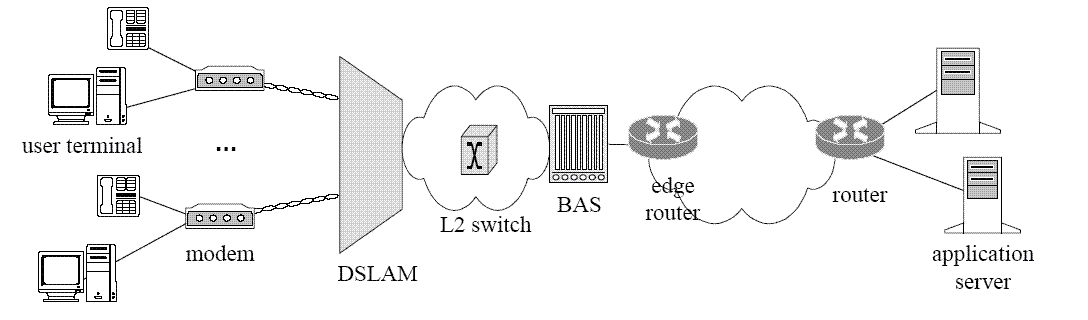
An ISP (Internet Service Provider) is a company that collects a monthly or yearly fee in exchange for providing the subscriber with Internet access.
An ISP might provide dial-up service, cable, DSL, or other types of Internet access. Some ISPs are local while others are national. A national ISP will provide access throughout most of the nation, while a local ISP will only serve subscribers in a limited geographical region.
When looking for an ISP the initial consideration is the type of access desired. Some ISPs only offer dial-up access which is the slowest type of connection. If you want cable service, you'll be checking with your local cable TV provider to see if cable access is offered. For DSL service, you may have multiple choices - or it could be that DSL is not yet available in your area. Often this can be remedied with a call to the phone company to upgrade local telephone lines.
Every ISP has a privacy policy and Terms of Service (TOS) contract that subscribers must agree to before subscription will be accepted. The privacy policy will state what the company will and will not do with personal information collected at the time of sign-up. Name, address, and normally a credit card number are required. The privacy policy should also state under what conditions your personal information might be shared with third parties, government officials, or others. The TOS contract stipulates how you can use the service. For example, dial-up access is often sold as "unlimited access" but this is not to be taken literally. Dial-up accounts normally limit hours per month to 250-400, depending on the ISP. Truly unlimited access (leaving your computer on and actively connected to the Internet 24/7) is called dedicated access. Most DSL or cable subscriptions allow dedicated access.
The Terms of Service contract of the ISP will also state rules about hacking, protecting copyrighted materials, denial of service attacks, harassing other people, spam, compromising the service, and many other issues. These are as much for the legal protection of the ISP as to let potential subscribers know what the ISP will and will not tolerate. If you are planning on using web space provided by the ISP, check for limitations here too. Many ISPs do not allow commercial websites to be set up on their servers. This usually means that nothing can be sold from your personal webspace, including for example, a software program you wrote, original music, or any other item. ISP websites are normally for personal use only, to blog, post pictures, and so on.
Once you find an ISP that offers the services, privacy policy and TOS you can live with, you can sign up online through a public terminal, or call. From here all that needs to be done is to enter the ISP access number and a few other parameters into the networking software on your computer.
ISP services range in price according to the package offered, and type of service. Dial-up is least expensive, and perks will vary greatly between ISPs. Some offer multiple email accounts, others vast amounts of webspace, and still others discounts for paying in advance. DSL and cable companies will also differ, so carefully read through offerings before deciding. If you are getting an ISP other than cable, you will likely have choices. There are many websites that offer reviews from present subscribers of various ISPs, which might be helpful in making a decision.
An ISP might provide dial-up service, cable, DSL, or other types of Internet access. Some ISPs are local while others are national. A national ISP will provide access throughout most of the nation, while a local ISP will only serve subscribers in a limited geographical region.
When looking for an ISP the initial consideration is the type of access desired. Some ISPs only offer dial-up access which is the slowest type of connection. If you want cable service, you'll be checking with your local cable TV provider to see if cable access is offered. For DSL service, you may have multiple choices - or it could be that DSL is not yet available in your area. Often this can be remedied with a call to the phone company to upgrade local telephone lines.
Every ISP has a privacy policy and Terms of Service (TOS) contract that subscribers must agree to before subscription will be accepted. The privacy policy will state what the company will and will not do with personal information collected at the time of sign-up. Name, address, and normally a credit card number are required. The privacy policy should also state under what conditions your personal information might be shared with third parties, government officials, or others. The TOS contract stipulates how you can use the service. For example, dial-up access is often sold as "unlimited access" but this is not to be taken literally. Dial-up accounts normally limit hours per month to 250-400, depending on the ISP. Truly unlimited access (leaving your computer on and actively connected to the Internet 24/7) is called dedicated access. Most DSL or cable subscriptions allow dedicated access.
The Terms of Service contract of the ISP will also state rules about hacking, protecting copyrighted materials, denial of service attacks, harassing other people, spam, compromising the service, and many other issues. These are as much for the legal protection of the ISP as to let potential subscribers know what the ISP will and will not tolerate. If you are planning on using web space provided by the ISP, check for limitations here too. Many ISPs do not allow commercial websites to be set up on their servers. This usually means that nothing can be sold from your personal webspace, including for example, a software program you wrote, original music, or any other item. ISP websites are normally for personal use only, to blog, post pictures, and so on.
Once you find an ISP that offers the services, privacy policy and TOS you can live with, you can sign up online through a public terminal, or call. From here all that needs to be done is to enter the ISP access number and a few other parameters into the networking software on your computer.
ISP services range in price according to the package offered, and type of service. Dial-up is least expensive, and perks will vary greatly between ISPs. Some offer multiple email accounts, others vast amounts of webspace, and still others discounts for paying in advance. DSL and cable companies will also differ, so carefully read through offerings before deciding. If you are getting an ISP other than cable, you will likely have choices. There are many websites that offer reviews from present subscribers of various ISPs, which might be helpful in making a decision.